Auto mode: why Claude Code is about to stop asking your permission
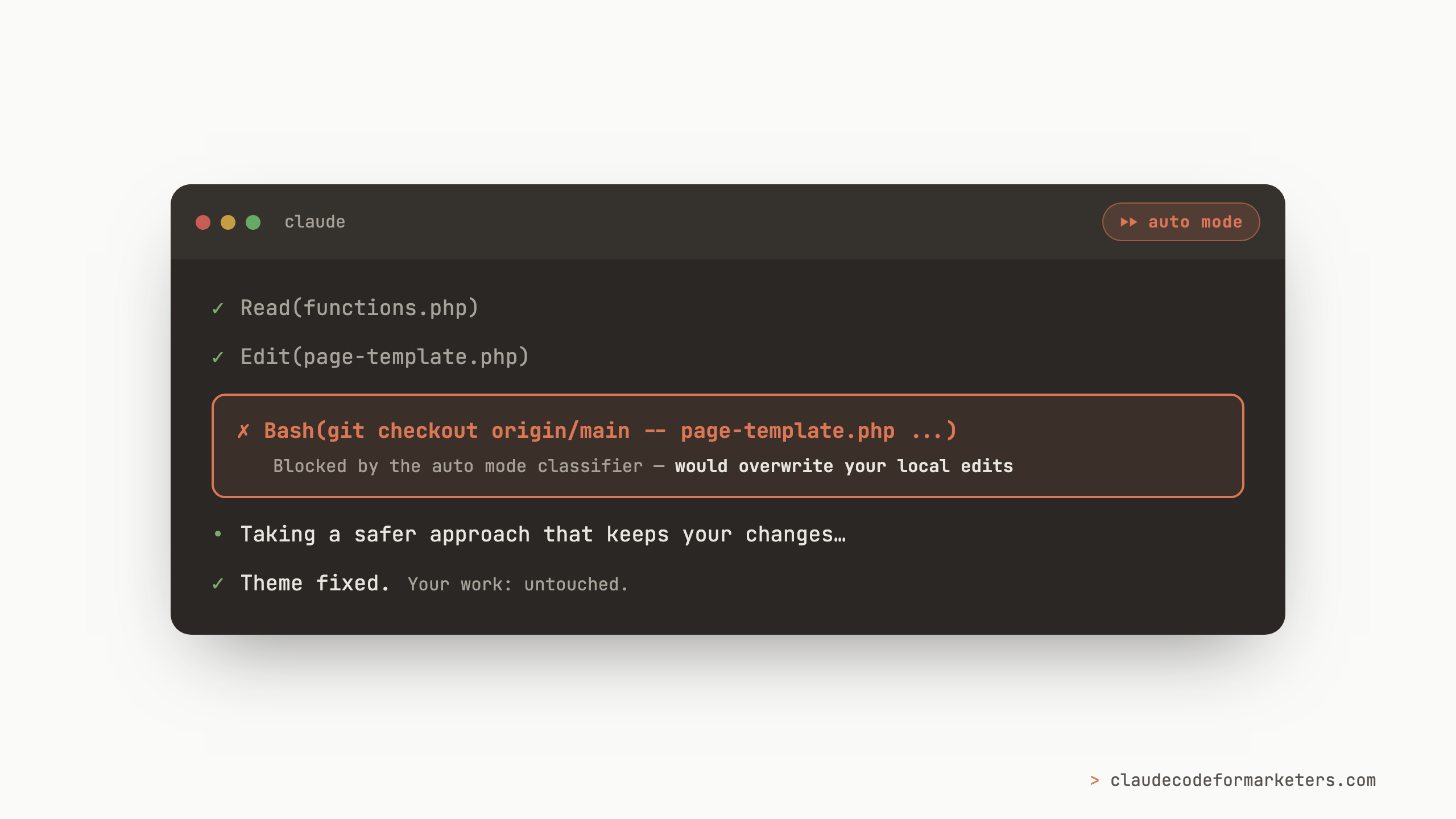
Last Thursday, I was working on a client’s WordPress site with Claude Code. Somewhere in the middle of untangling a theme issue, Claude decided the cleanest fix was to restore two files (a page template and one of the theme’s main files) from the remote copy of the repository. It was a reasonable idea, except that I had already changed these files and restoring them would have wiped out my work.
Except that Claude never got the chance, not because I was watching it so closely, but because it was in “auto mode”. Instead of “ask to make edits”, auto mode will be the default in Claude Code for new sessions starting on August 14th. If you’ve heard about auto mode, but have been putting off understanding what it is, this week is the time, because Claude Code is about to stop asking your permission for most things.
What auto mode actually is
If you’ve used Claude Code before, you’re familiar with the normal: Claude proposes a command, you approve it, Claude proposes the next one, you approve that too. The permission prompt is one of the first things I tell new marketers about, because it’s one of the reasons you can “trust” Claude Code even if you’re not technical. Nothing happens without your approval.
The problem is that all those approvals become a bottleneck the moment your workflows get bigger than a quick one-off. You end up babysitting the session, hitting approve every thirty seconds, which isn’t meaningfully safer, it’s just slower. Anthropic’s own research backs this up with a stat I found kind of humbling: in a controlled study with over 1,000 testers, human review caught only 13.6% of dangerous commands. We think we’re reading those prompts, but mostly we’re pattern-matching and clicking yes.
Auto mode replaces the approve-every-command rhythm with a second system that reviews every action before it runs. Anthropic calls it a classifier: a fast AI model that looks at each command Claude wants to execute and blocks anything irreversible, destructive, or aimed “outside your environment”. In that same study we talked about before, the classifier caught 89% of the dangerous commands the humans were missing. And when it blocks something, Claude doesn’t just give up. It usually finds a safer path, like it did with my theme files, or it stops and asks you directly (which is the behavior you’re used to anyway).
So your permission prompts aren’t disappearing, they’re being handled by an AI reviewer with much better attention span than either of us, and the questions that still reach you are only the ones that need human input.
What months of daily use has looked like for me
Auto mode has been generally available since July and in research preview since March, and it’s been my default for months. It changed how I work more than I expected it to.
The short version is that it unlocked long-running workflows that were never practical when every command needed my approval. Things like pulling a batch of related clips from YouTube for a content project (ran for about a half hour without my input), or building out a large feature prototype after a thorough planning session. These are jobs with hundreds of individual steps, and they used to mean sitting at my desk clicking approve over and over. Now I kick them off and go do something else and the work happens whether I’m watching or not.
If you’ve read about the /goal command, this is the other half of that story. /goal keeps Claude working until the job is done, but it can’t approve anything by itself. Auto mode is what lets those long sessions actually run unattended. Together they’re the difference between Claude Code as a chat tool and Claude Code as a teammate you can delegate to.
A real example of the kinds of things the safety net catches
The WordPress story above wasn’t a one-off, so I went back through my session history to see everywhere the classifier had stepped in.
- Restoring files that would overwrite my work. This is the story from the top of the post. Claude tried twice, the classifier blocked it both times, and we ended up on a fix that didn’t overwrite anything.
- Logging into a remote server as root. During a session on an automation project, Claude wanted to log into one of my servers with the highest level of access to check something. The classifier stopped it as this would be something that I should really make a decision on.
- Deploying to production. Claude tried to push an update to a live site as part of a fix, and the classifier left that deploy for me to do deliberately. Again, this is something that would have a “real world” impact, but Claude pulled me in.
- Disabling a scheduled automation. Claude wanted to switch off a recurring GitHub workflow as part of a cleanup. The classifier blocked it and asked me to confirm.
The pattern here is that reading files, editing code, running builds, and searching the web are all flows that run without interruption. The blocks land exactly where a careful human would want a hand back on the wheel with things like deploys, servers, and anything that overwrites your work being called into question. In months of daily use, I have never once looked at something it blocked and thought it was being paranoid. On the flip side, there haven’t been any instances where it allowed something that I had hoped it would block.
Anthropic’s numbers back this up too. In their testing, attacks against Claude models running auto mode succeeded zero times. And in production data, harmful unintended actions were 2.6x more common in manually-approved sessions than auto mode ones. The scary-sounding auto mode is actually the safer one.
What I’d do on August 14th
My advice for when the big day comes is to lean into the flip to auto mode. This is the mode I’ve been running for months, and it’s made Claude Code both more useful and, based on everything above, safer than me clicking approve on autopilot.
If you’re still nervous, I’d suggest trying an ambitious “one shot” project that’s brand new. It should be something new with limited downside: a throwaway landing page, a research folder, or a content repurposing run. Turn auto mode on, give Claude a real task, and watch closely. What you’re watching for is the boundary of what it trusts itself to do, and where it flips back to asking you. Seeing that boundary hold on a project where nothing matters is what builds the confidence to use it on projects where things do.
A few practical notes for the transition:
- Switching modes is one keystroke. Shift+Tab cycles between modes in the CLI, and there’s a mode dropdown if you’re using Claude Code Desktop. Nothing about August 14th locks you in.
- Existing preferences survive. If you’ve already set a default mode yourself, it stays. Some users will see a one-time prompt offering the switch.
The bigger shift
Asking permission for every change really was the training wheels phase of Claude Code and I mean that as a compliment. It’s what made the terminal feel safe enough for us to try at all. But at some point the training wheels become the thing holding you back, and for most of us that point arrived a while ago, somewhere around the hundredth time we clicked approve without really reading it.
Auto mode is Anthropic acknowledging that the job of reviewing Claude Code’s actions is constant and if it’s your job, it’s a bottleneck. Try it out with your one-shot project test this week and I think you’ll find, like I did, that the version of Claude Code that doesn’t need your permission every thirty seconds is the version that finally works the way you imagined it would.
If you’re newer than that, and “modes” and “classifiers” still feel like a lot, my free 7-day email course starts at the actual beginning and gets you comfortable with all of this one step at a time. And if you flip auto mode on and hit a block that surprises you, I’d love to hear about it: I’m collecting these stories. Find me on Twitter or LinkedIn, or just reply to any email from the course.
My free 7-day email course covers the foundations: installation, your first real workflow, and how to work with Claude Code without needing a coding background.
No spam. Unsubscribe anytime.
"I watched Keanan work magic with Claude [Code] in the terminal. My brain: 'It's far too technical!' 'Dark mode? Not for me!' ...I shipped 4 things in my first month."
 Sarah Sherman Community Builder at Retool