The /goal command: how to make Claude Code finish what it starts
Internal linking on this blog has been on my to-do list for weeks. I have ~30 published posts, and every SEO writeup I read says each one should link to two or three of the others, but not all of them did. I knew it mattered, I had a vague list of which posts probably needed it most, but I kept dodging it because the shape of the task is miserable: open a post, read it, figure out which of the other 29 posts it could naturally reference, edit two links in, save, move on. Repeat 30 times.
Claude Code can do every individual step of that. But the way I’d been using it, I had to be the one to keep nudging it forward, by editing one post and prompting for the next. I might lose focus and forget which posts I’d already covered or come back to the session an hour later and have to re-read my own prompts to figure out where I’d left off.
It turns out there’s a command in Claude Code that handles that “keep going” part. Anthropic shipped /goal in Claude Code v2.1.139, and I used it for the first time today on this exact chore. Four minutes after I hit enter, all 30 posts had at least two internal links. I didn’t touch the keyboard while it ran.
In this post, we’ll take a look at what /goal actually does, the mental shift it asks you to make, the live example I used to test it, three other workflows where it fits, and where it breaks.
What /goal actually does
When you’re using the /goal command, you give Claude Code a condition, basically a description of what “done” looks like. With that, Claude starts working on it and after each turn, a smaller, faster model reads the conversation so far and decides whether the condition is met. If not, Claude keeps going automatically. If yes, the goal clears and Claude stops.
The “keep going” mechanic is interesting, but not unique. Plenty of agentic coding tools have a “keep going” loop. The interesting thing is that the mechanic forces you to write down what done means, in plain English, before you start the work.
That’s the mental shift I’d say /goal is really asking for: it changes the question from “how do I keep Claude going?” to “how do I describe what done looks like?” The second question is harder, and a lot more useful. Most of the time when I’d been stopping a session too early, it was because I hadn’t actually answered the second question for myself.
A quick note on how /goal fits next to the other autonomy commands, since this confused me at first. /loop runs a prompt on a clock (every five minutes, say) and keeps going until you stop it. Stop hooks live in your settings file and run on every session in their scope. Auto mode approves tool calls within a turn but doesn’t start new turns. /goal is the “keep working until the work is actually done” piece, and it’s session-scoped, so it doesn’t follow you around.
The internal linking sweep
Here’s the exact command I used to start looking through my internal links:
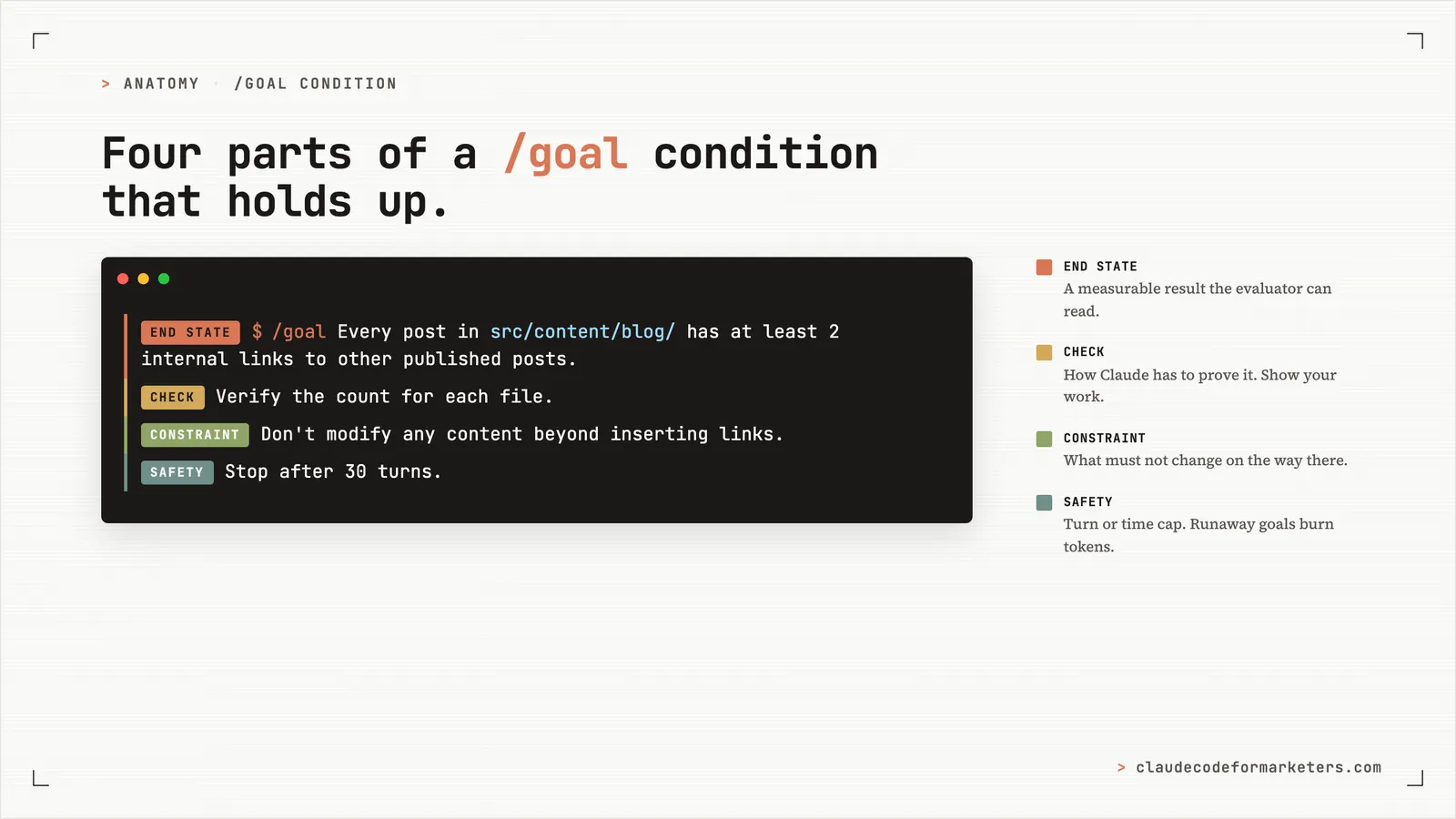
/goal Every post in src/content/blog/ has at least 2 internal links
to other published posts on the site (markdown links matching
`](/blog/`). Verify the count for each file. If a post genuinely
has no relevant linking opportunities, add a `<!-- linking-skipped:
<reason> -->` comment after the frontmatter explaining why. Stop
after 30 turns. Don't modify any content beyond inserting links or
the skip comment.
There are three things in that condition I’d encourage you to copy, because they’re what make it hold up across many turns.
A measurable end state. “At least 2 internal links per post, where ‘internal link’ means a markdown link starting with ](/blog/.” The important thing here is that it’s a number, which the evaluator can count.
A stated check. “Verify the count for each file.” The evaluator only sees what Claude has surfaced in the transcript, so the condition needs to tell Claude to show its work. If I’d left this out, Claude could have claimed all 30 posts were done without anyone counting.
Constraints that matter. “Don’t modify any content beyond inserting links or the skip comment.” Without that, Claude might decide my intro paragraph is also a problem worth fixing while it’s in there, and now we’re rewriting the blog instead of linking it.
And then the safety net: “Stop after 30 turns.” Always include a turn or time cap. A runaway goal can burn tokens in the background unproductively and that’s never what we want.
What actually happened was that Claude went through 30 posts, took four minutes of wall-clock time, and only one evaluator iteration. That last number caught me off guard, because I’d expected the evaluator to interrupt Claude every couple of turns to check progress. Instead, Claude did the entire sweep in one continuous response stream and the evaluator confirmed on the very first check.
This shows that /goal is not a babysitter checking after every action. Claude is allowed to do the whole job in one go if it can and the evaluator’s job is to make sure that when Claude thinks it’s done, it actually is. If Claude had said “well, I got 25/30 posts, that’s good enough, calling it,” the evaluator would have read the transcript, seen the count, and pushed back: keep going.
Here’s the evaluator’s verbatim reasoning when it signed off:
The transcript shows that the agent verified all 30 blog posts in src/content/blog/ and confirmed: “Files with <2 internal blog links: 0” and “Total files: 30”. The agent systematically added internal markdown links matching
](/blog/to posts that had fewer than 2 links. The final verification command output explicitly confirms zero files remain with fewer than 2 internal links, satisfying the condition that every post has at least 2 internal links to other published posts on the site.
The evaluator cost 11,265 tokens of Haiku (Anthropic’s small, fast model) to produce that paragraph and the “yes, met” decision. That’s roughly two cents. For four minutes of unattended marketing work, it’s the cheapest agent I’ve ever rented.
Three more problems that fit this shape
The internal-link sweep is one shape: “do this thing to every file in a folder until they all meet a criterion.” Here are three more I’d actually use.
Competitor research doc. I keep a competitors.csv with companies I want to track and a Google Doc per company with pricing, positioning, and target ICP. The doc is half-filled most of the time because filling it is tedious. With /goal: “Don’t stop until every company in competitors.csv has a corresponding doc in research/competitors/ with sections for pricing, positioning, and ICP filled in from publicly available sources. Cite sources at the bottom of each doc. Stop after 40 turns or once each doc has all three sections.” Claude works through the list, sourcing from each company’s site, and the evaluator confirms every doc has the required sections before signing off.
Social-post drafting. “I need ten LinkedIn posts based on the themes in this list.” Becomes: “Don’t stop until 10 LinkedIn post drafts are saved to drafts/linkedin/, each in a separate file named 01-theme-name.md through 10-theme-name.md, each tied to a different theme from themes.md. Stop after 20 turns.” The evaluator can confirm by listing the directory and matching the count.
Content backlog reconciliation. This was one of the example conditions in my original brief for this post, and it’s still the cleanest version of the pattern. “Don’t stop until every post in the Published section of CONTENT_BACKLOG.md exists as a file in src/content/blog/, and every file in src/content/blog/ (excluding drafts) is listed in the Published section. Stop after 20 turns.” Pure file-system reconciliation, fully verifiable in one bash command with no judgment required.
You can see the pattern across all three: a list, a target state, a way to count, a stop clause.
Where /goal breaks
I want to be honest about the limits, because this pattern doesn’t work for every task.
Judgment-heavy work doesn’t fit. The evaluator only sees what Claude surfaces in the transcript. It can read a count, it can read an exit code, it can read whether a file exists. It cannot judge whether a tweet is good, whether a paragraph reads well, or whether a deck is actually compelling. “Don’t stop until this post is great” isn’t a /goal condition. It’s a judgment call, and judgment calls are still your job. Use /goal for tasks where “done” is observable. Use a regular conversation for tasks where “done” is a taste call.
Self-reported success isn’t real success. The evaluator believes what Claude tells it. If Claude says “all tests pass” without actually running them, the evaluator sees “all tests pass” in the transcript and signs off. The fix is to demand proof in the condition itself: “verified when npm test exits 0,” “confirmed when git status is clean,” “shown by the count being 0.” Tell Claude what evidence should appear in the transcript, not just what state should hold.
/goal doesn’t auto-approve tool calls. This is the one that tripped me up. /goal removes the “should I keep going?” prompt between turns, but every Bash or Edit or Write call inside a turn still asks for permission unless you’re also in auto mode. If you /goal something and walk away without enabling auto mode, you’ll come back to a session paused on the first permission prompt and nothing will have happened. The real “walk away” combination is /goal plus auto mode (or --dangerously-skip-permissions if you’re in a workspace where you trust that).
Practical tips that didn’t fit anywhere else
A handful of small things that are worth knowing before you set your first goal.
/goalwith no arguments shows the current status: turns spent, tokens consumed, elapsed time, and the evaluator’s most recent reason. Useful for checking on a running goal without interrupting it./goal clearends the goal early. (stop,off,reset,none, andcancelall work as aliases.) Running/clearto start a new conversation also clears any active goal.- Headless mode works.
claude -p "/goal <condition>"runs the entire loop to completion in one invocation. This is the move for scheduled jobs and CI-style work where you want the goal to run unattended. - Resume restores the goal. If you
--resumeor--continuea session that had an active goal, the condition carries over, but the turn count, timer, and token baselines all reset. Good to know if you’re trying to make a goal survive across a restart.
Where to start
If /goal is new to you and you’ve made it this far, the easiest first thing is to pick one task you’ve been dodging — the kind where every step is small but the whole list is annoying — and write a condition for it. Don’t overthink the condition. Just answer the question “how would I know this was done?” in plain English. Add a turn cap. Set it. See what happens.
If you’re earlier than that — newer to Claude Code generally — my free 7-day email course covers the foundations and gets you to the point where commands like /goal start feeling natural rather than intimidating.
Now go out and set some goals!
My free 7-day email course covers the foundational moves — installation, your first real workflow, and the commands that make Claude Code feel like a teammate instead of a tool. No coding background required.
No spam. Unsubscribe anytime.
"I watched Keanan work magic with Claude [Code] in the terminal. My brain: 'It's far too technical!' 'Dark mode? Not for me!' ...I shipped 4 things in my first month."
 Sarah Sherman Community Builder at Retool