How I subtitle videos with Claude Code (a skill that runs Whisper for you)
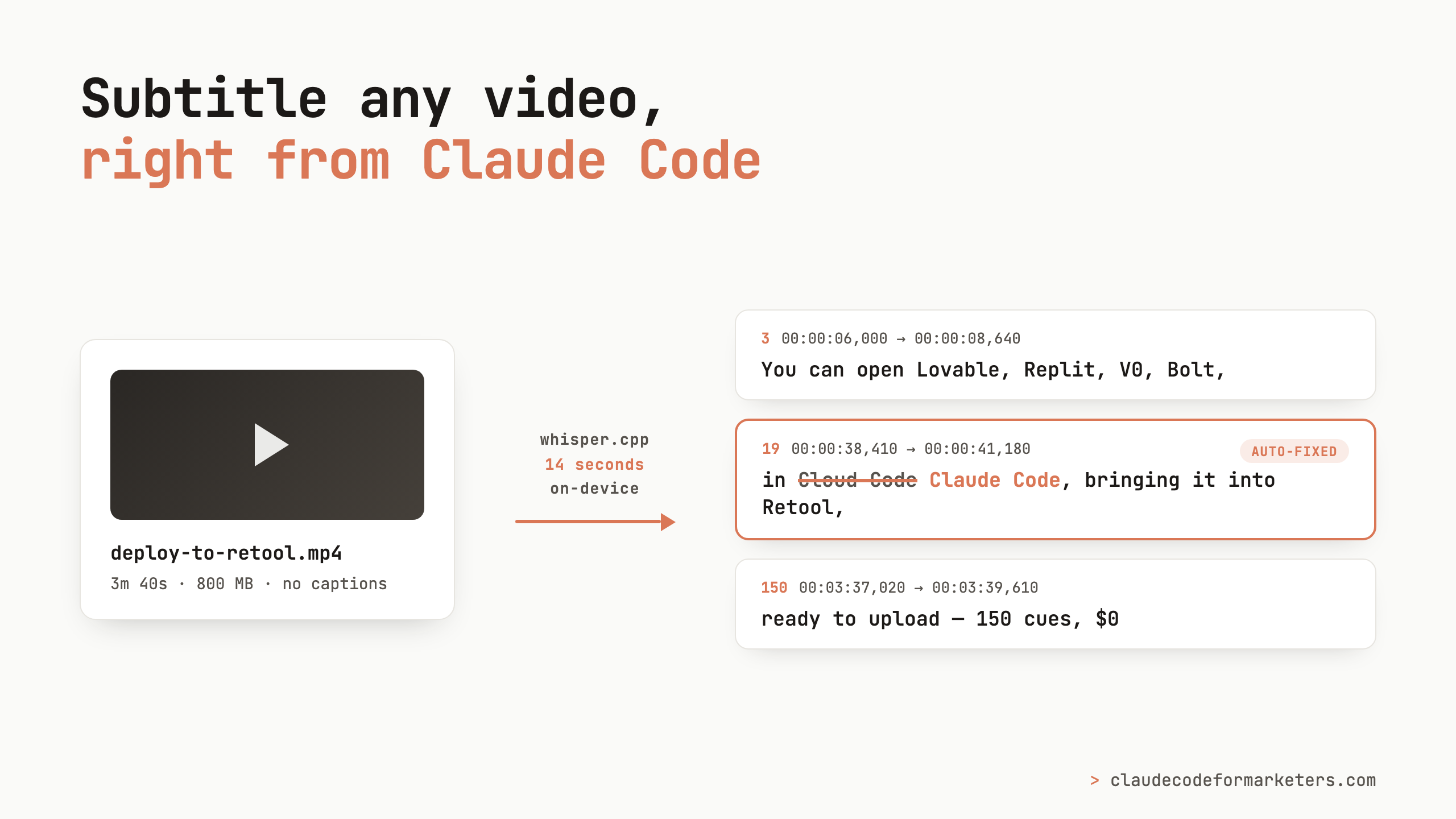
I just finished editing a walkthrough video a couple of weeks ago but it was sitting ready to upload because I hit the part of publishing I always put off the longest: captions.
Captions are one of those tasks that’s mandatory but never fun. They make your video accessible, plenty of people watch with the sound off, and platforms reward videos that people actually keep watching. But actually producing them has always meant picking between bad options: hand-typing them in YouTube Studio, accepting auto-captions that mangle every product name, or paying a SaaS tool by the minute to do what is, at its core, a pretty mechanical job.
I have a bad habit of letting videos sit fully edited for days because I’m avoiding this very step. So I did what I keep doing with these repeated chores: I built the boring part into a Claude Code skill so I never have to think about it again.
Subtitles without uploading your video anywhere
The skill is built around an open source speech-to-text model from OpenAI called Whisper. It’s the same technology a lot of those per-minute caption services are running behind the scenes, except you can run it directly on your own computer. My skill uses a version called whisper.cpp that’s tiny (the install is about 8 MB), free, and fast on a modern Mac.
That “on your own computer” part matters more than you might think! Your video never gets uploaded to anyone’s server, which is a real consideration if you’re captioning internal videos, client work, or anything under embargo. And there’s no metered pricing: so whether you caption one video this month or forty, the cost is the same ($0).
The skill handles the whole pipeline: it checks that the right tools are installed, pulls the audio out of your video, transcribes it with Whisper, and then does a cleanup pass for typos and brand names before handing you a finished .srt subtitle file. (If skills are new to you, here’s my intro to what they are and how they work.)
What actually happened when I ran it
Here’s the real session, from the video I mentioned above. My entire prompt:
Let’s run the /subtitle skill on @deploy-to-retool.mp4 in this directory
From there, Claude worked through the steps on its own:
- Checked the prerequisites. It confirmed ffmpeg and whisper.cpp were installed, then looked for a Whisper model already on my disk before downloading anything. It found one left over from another project and just reused it.
- Extracted the audio. Whisper only needs the audio track, so the skill pulls it out into a small audio file rather than feeding it the whole 800 MB video.
- Transcribed it. This is the part that still surprises me: transcribing the full 3 minute 40 second video took about 14 seconds. Locally, on my laptop 🤯
- Cleaned it up. More on this in a second, because it’s the step that makes using Claude Code a better option than any of the off-the-shelf captioning tools.
The output is a standard .srt file, which is just a plain text file of numbered, timecoded cues:
3
00:00:06,000 --> 00:00:08,640
You can open Lovable, Replit, V0, Bolt,
Mine came out to 150 cues covering the whole video, each capped at about 42 characters so they’re comfortable to read on screen.
Getting the brand names right the first time
Auto-captions have one signature failure: proper nouns. Product names, company names, and jargon come out mangled, because the model has never been told what words to expect.
Whisper has a fix for this, and the skill uses it. You can seed the transcription with a prompt, basically a cheat sheet of spellings, and the skill asks for your brand and product names and passes them along. For my video that list was things like Retool, OAuth, PostgreSQL, and React.
The result: Retool, React, Postgres, Salesforce, Snowflake, Lovable, Replit, V0, and Bolt all came through correctly spelled and correctly cased, on the first pass. If you’ve ever cleaned up auto-captions by hand, you know how unusual that sentence is.
The other piece here is that because Claude is a language model, it can fix a bunch of the other obvious auto-captioning mixups automatically, without you having to dive into the srt.
The mishear that proves why you still review
One error did slip through, and I love it too much not to share. Four separate times, Whisper transcribed “Claude Code” as “Cloud Code.” (Apparently I pronounce it weirdly?) The transcription tool misheard the name of the tool that was running it.
This is exactly why the skill ends with a deliberate cleanup pass instead of declaring victory after transcription. Claude scanned the file for likely problem words, spotted the pattern, fixed all four occurrences in one go, and then ran a verification check to confirm the fix landed and no strays were left behind. My total involvement in this step was reading a two-line summary of what got fixed.
I’d say this is the honest version of every AI workflow I actually rely on: the tool does 98% of the work, and a built-in review step catches the 2% that would’ve been embarrassing. As with most AI tools, it’s rarely perfect on the first try, and the workflows that hold up are the ones that plan for that and keep a human (me) in the loop.
Install it yourself
The skill is open source in my cc-skills repo. To set it up:
- Install the two tools it depends on (or have CC do it for you). On a Mac, that’s one command:
brew install ffmpeg whisper-cpp - Install the skill. Copy the
video-subtitlerfolder from the repo into~/.claude/skills/. - Run it. Point Claude Code at a video and ask it to subtitle it. The first run will download a Whisper model if you don’t have one (a one-time download, roughly 150–450 MB depending on the model), and every run after that is just fast.
It also handles YouTube URLs, so you can caption a video that’s already published by handing Claude the link instead of a file.
If this is your first skill, it’s a good one to start with, because it’s a complete answer to a chore you already have. And it’s part of a bigger pattern I keep coming back to on this blog: marketers building their own small tools instead of renting them. That’s the same idea behind the Chrome extension I built as my first tool, and if you want more skills worth installing, I rounded up my favorites here.
The next video you publish is going to need captions. This time, the captions step can be the easy part.
Building your own skills, or got a chore you think should become one? I’d love to hear about it. Find me on Twitter or LinkedIn, or email me at [email protected], and let’s figure out our next workflow together.
Join 190+ marketers who have gone through the free 7-day email course and learn how to use Claude Code for your marketing work and get notified when we publish new use cases and ways to stay ahead of the curve.
No spam. Unsubscribe anytime.
"I watched Keanan work magic with Claude [Code] in the terminal. My brain: 'It's far too technical!' 'Dark mode? Not for me!' ...I shipped 4 things in my first month."
 Sarah Sherman Community Builder at Retool