The solo marketer's AI stack: how to do the work of 10 people
In any given week, I’m publishing on this blog, running marketing for my agency, producing videos for a YouTube channel, and shipping random side projects on keanan.fun: Good Ice Map, Five Mile Walk, hackernews.lol, a thermal printer that prints video ideas, a domain availability bot, a few others.
I am just one person. And I don’t have a junior marketer helping me with social posts or web copy. The math on doing all of this alone, the old way, doesn’t work.
The reason it works now is that I’ve built a real stack around Claude Code. Specific skills, specific integrations, specific tools that hold specific kinds of data. Each project plugs into the same stack, which is why the marginal cost of adding another one keeps going down.
A few concrete examples from the last few weeks, just to ground this:
- I turned a single podcast appearance into ten social posts in one Claude Code session. Wrote them, scheduled them, moved on.
- I shipped a landing page for Good Ice Map in a single afternoon.
- I audit my own old posts every couple weeks for stale facts. I built a skill for that, and it runs in the background while I work on something else.
- I built an infographic for an agency post in under an hour instead of waiting on a designer.
None of these would happen on their own without the various tools in my AI stack. So let’s walk through it, layer by layer.
The stack at a glance
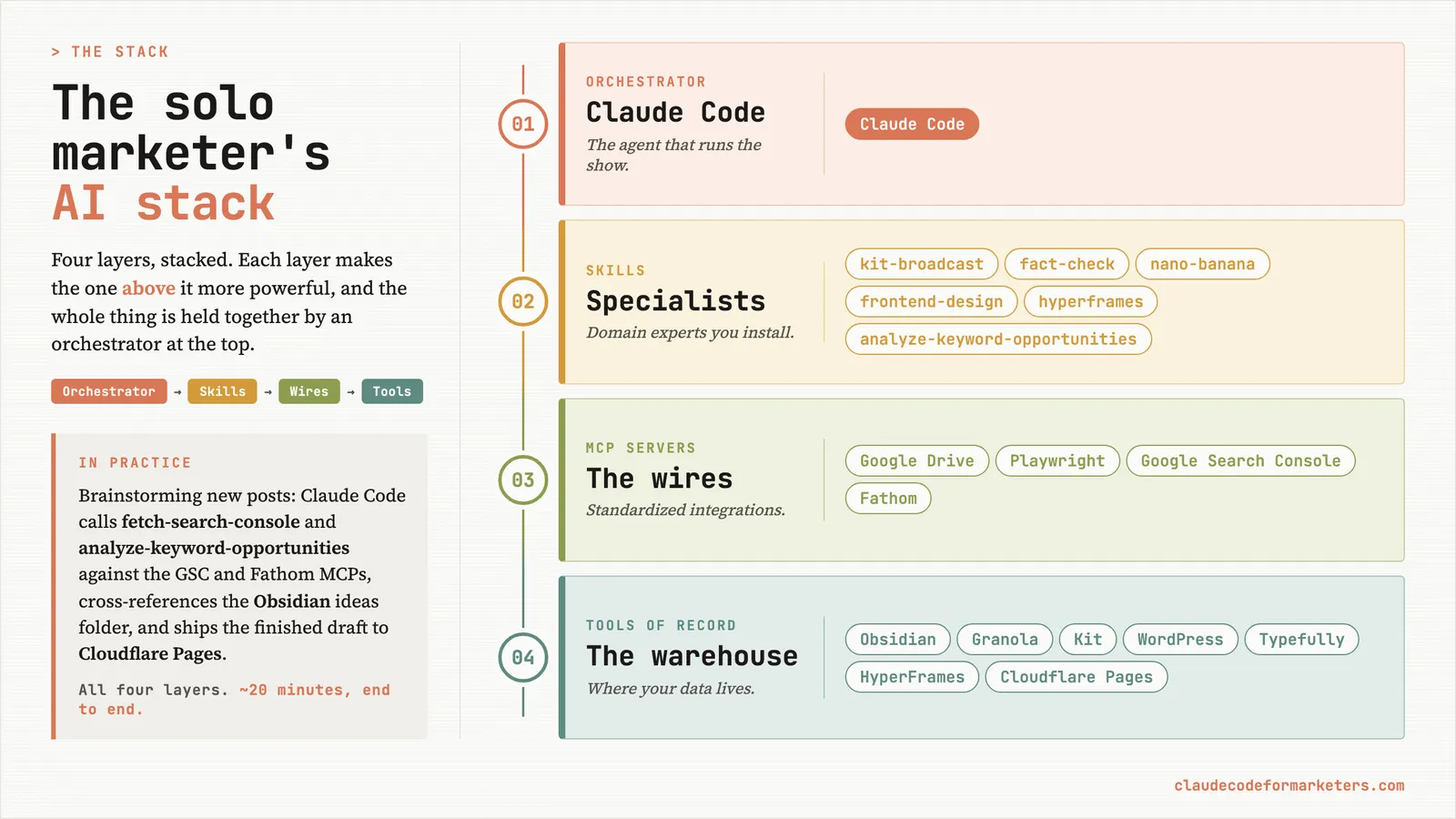
It’s helpful to think of the stack itself in layers. Each layer makes the one above it more powerful, and the whole thing is held together by Claude Code at the top. The top layer is the agent that runs the show. Everything below it is something the agent can call, read from, or write to. The whole point is that I almost never leave the orchestrator to get real work done in any of the lower layers.
Layer 1: the orchestrator
Claude Code sits at the top of my stack and it’s the only layer I’d call non-negotiable. The rest of it is interchangeable. I could swap Obsidian for Notion, Kit for Mailchimp, Cloudflare Pages for Vercel, and not much would actually change in the day-to-day. But the orchestrator has to be something that can see my files, run scripts, call other tools, and remember what happened in our last session.
That’s why Claude Code specifically. Chat-style agents like ChatGPT or Claude.ai are great at one-shot answers, but they can’t reach into a folder of campaign assets, run a query against my analytics, and write the result back into a doc. The terminal-based agent can. It’s the difference between asking someone for advice and hiring them to do the work.
There’s a longer post on why I use Claude Code over ChatGPT for marketing work if you want the comparison in detail. The short version is that everything else in this stack assumes there’s an orchestrator at the top that can actually do things, not just describe them.
If you’ve never installed it, your first 5 minutes with Claude Code is the place to start. And if the word “terminal” is what’s stopping you, don’t be scared of the terminal was written specifically for you.
Layer 2: skills
Once the orchestrator is in place, the next layer is skills. Skills are specialized capabilities that get installed alongside Claude Code and activate when the situation calls for them. Think of each one as a domain expert that shows up when needed, brings the right context, does the job, and steps back out of the way. I wrote the full explainer on what skills are if you want the deeper version.
The skills I run nearly every week:
- kit-broadcast turns a freshly published blog post into a scheduled email broadcast. I built it because the manual version used to take me thirty minutes, and now it takes about ninety seconds.
- fact-check audits any article for stale claims. Pricing that’s changed, features that have been renamed, dates that have aged. The full story behind why it exists is here.
- nano-banana generates images. Featured images for posts, thumbnails for the YouTube channel, the occasional icon or quick illustration. I almost never open a separate image tool anymore.
- frontend-design is Anthropic’s built-in skill for production-quality web interfaces. It’s what I lean on when I’m building a landing page from scratch.
- hyperframes handles motion graphics. Short videos, animated openers, B-roll for the YouTube channel. Composition is written as HTML, which means Claude Code can iterate on it the same way it iterates on anything else.
A second class of skills is worth mentioning here too: project-specific ones. The skills above all live in my home directory and show up across every project. But some skills only make sense inside a single project. I keep a separate marketing-report repo with about a dozen skills wired specifically to it: fetch-search-console, fetch-fathom, analyze-keyword-opportunities, analyze-content-performance, and a few more that exist purely to run my weekly reporting workflow. You’ll see them show up in the example a few sections down.
If you want a starting point for finding more general-purpose skills, Corey Haines maintains a public repo of marketing-focused skills covering CRO, copywriting, SEO, analytics, and growth engineering, which is hugely helpful if you’re just getting started.
Layer 3: MCP servers
If skills are the specialists, MCP servers are the wires that connect Claude Code to the outside world. MCP servers are the same idea as a connector or an integration, just standardized so any agent can plug into them. The longer story on why MCP matters is worth a read if you’ve never used one.
The MCPs I keep wired in are infrastructure layers, not specific tools where my data lives. These are the ones that show up in almost every workflow:
- Google Drive for reading and editing Docs and Sheets. The original “wait, Claude can do this?” moment for me, and the walkthrough on getting it set up is one of the most-trafficked posts on this site for exactly that reason.
- Playwright for anything browser-related. Screenshots of competitor sites, scraping a page that doesn’t have an API, extracting the visual identity from a live URL into a brand guide, pulling page-load data. The catchall for “the thing I need lives in a browser.”
- Google Search Console for search performance. Which queries are driving impressions to which pages, where I’m ranking position 7-13 (the striking-distance opportunities), and which posts are quietly decaying. Probably the single most useful MCP for anyone running a content site.
- Fathom for analytics. Traffic, event counts, conversion data, all pulled into reports without me logging into a dashboard.
Each MCP I add is roughly one more “thing I no longer have to switch contexts for.” That’s the whole game with this layer.
Layer 4: complementary tools
These are the systems where the actual data lives. Claude Code reaches into them through the layers above, but they’re not the agent itself. They’re the warehouse, not the worker. Some of them have their own MCP server (mentioned inline below); some don’t, and Claude Code reaches them other ways.
- Obsidian is my second brain. Drafts, prompt library, notes from calls, half-baked ideas, everything. No MCP needed because Claude Code reads and writes the folder directly, since Obsidian is just markdown files.
- Granola is where my meeting notes live. Every call I’m on gets transcribed and summarized. Granola publishes its own MCP server, so when I want to mine the last few weeks of calls for content ideas or follow-ups, Claude Code can pull the transcripts directly. The setup walkthrough is inside this post on repurposing call transcripts.
- Kit is the email system of record. Subscribers, sequences, broadcasts. There’s an MCP for it, so the kit-broadcast skill (Layer 2) can talk to Kit without me ever opening the app.
- WordPress is where the agency site lives. The WordPress MCP lets me draft a post in Claude Code, run a final pass, and push it live without ever opening wp-admin. Full walkthrough here.
- HyperFrames is where video compositions get rendered. The skill (Layer 2) writes the composition; HyperFrames renders the actual MP4. Same pattern as Kit: tool below, skill above.
- Typefully handles social scheduling. Drafts get written in Claude Code (often by reusing call transcripts or repurposing posts) and queued up in Typefully.
- Cloudflare Pages is where this site actually deploys. I push, it builds, it ships.
The reason any of this works as a stack and not as a pile of disconnected tabs is that I’m rarely switching contexts to use any of them. I describe what I want to Claude Code, it picks up the right skill or MCP server, the work lands in the right system, and I move on to the next thing.
How the layers actually flow together
The four layers feel abstract until you watch one workflow run through all of them. Here’s a real one from earlier this week, brainstorming new posts for this blog.
I opened Claude Code (Layer 1) inside the marketing-report repo, where the project-specific skills I mentioned a few sections up live. The fetchers pull the data: fetch-search-console (Layer 2) hits the Google Search Console MCP (Layer 3) and pulls ninety days of per-page query data; fetch-fathom (Layer 2) hits the Fathom MCP (Layer 3) for live traffic. Both write the results out as structured JSON for the analyzers to chew on.
Then the analyzer skills do the actual thinking. analyze-keyword-opportunities (Layer 2) takes the GSC pull and identifies which queries are sitting at position 7-13 just outside the first page, which ones have impressions but zero clicks, and which clusters don’t have a dedicated post yet. analyze-content-performance (Layer 2) does the same kind of pass on the Fathom data: which posts are quietly decaying, which are over-performing relative to their search position, which deserve a refresh before a brand new draft. Each one writes its own insights file.
From there I asked Claude to cross-reference everything against my Obsidian ideas folder (Layer 4) so I wouldn’t end up briefing something I’d already half-written. What came back was a ranked list of post ideas anchored in actual data, not vibes. Three of them got briefed in the same session, including a FAQ I’d been putting off because I couldn’t tell whether the queries were worth chasing. (They were, by a lot.)
Once I had a draft I liked, I committed it to the site repo and pushed. Cloudflare Pages (Layer 4) picked up the push, built the site, and deployed it in under a minute. From “I want to know what to write” to “the post is live” without leaving Claude Code at any point.
That single workflow touched the orchestrator, four skills, two MCP servers, two complementary tools, and ended in a live deploy. It would have been a full afternoon of spreadsheets and tab-switching with the old toolkit. It was about twenty minutes with this one. This is the kind of compounding that adds up across a week, and it’s the reason the math on running this many projects solo actually works.
What this stack still can’t do for you
Let’s take a quick honest diversion here, because there’s enough hype on this topic that I don’t want to add to it.
The stack handles execution. It does not handle relationships, sales conversations, or the kind of qualitative discovery work where the value is in the conversation itself. No agent is going to sit on a Zoom call and read the room. No agent is going to build the long-term trust that gets you the partnership, the speaking slot, or the referral. And no agent is going to replace the slow, quiet work of actually talking to your customers about why they bought.
What the stack does is take the execution work that used to fill your week and compress it into a fraction of the time, so the human work gets more of you, not less.
Where to start
You don’t need to build the whole stack on day one. You need the orchestrator (Claude Code). Everything else snaps in over time, one skill or MCP server or tool at a time, as the work asks for it.
So pick the orchestrator and get fluent there first. The rest gets easier once that’s in place. If you’re starting from scratch, the fastest path I know is my free 7-day email course. It walks you from “I’ve never opened a terminal” to “I’m running real marketing workflows with Claude Code.” Drop your email below and I’ll send you the first lesson.
And if you’re already running Claude Code as your orchestrator, I’d genuinely love to hear what’s in your stack. Reach out on Twitter, LinkedIn, or email me directly.
My free 7-day email course walks you from 'I've never opened a terminal' to 'I'm running real marketing workflows with Claude Code.' Once that's in place, the rest of the stack snaps in fast.
No spam. Unsubscribe anytime.
"I watched Keanan work magic with Claude [Code] in the terminal. My brain: 'It's far too technical!' 'Dark mode? Not for me!' ...I shipped 4 things in my first month."
 Sarah Sherman Community Builder at Retool