SEO on autopilot: using Claude Code to audit, optimize, and monitor your content
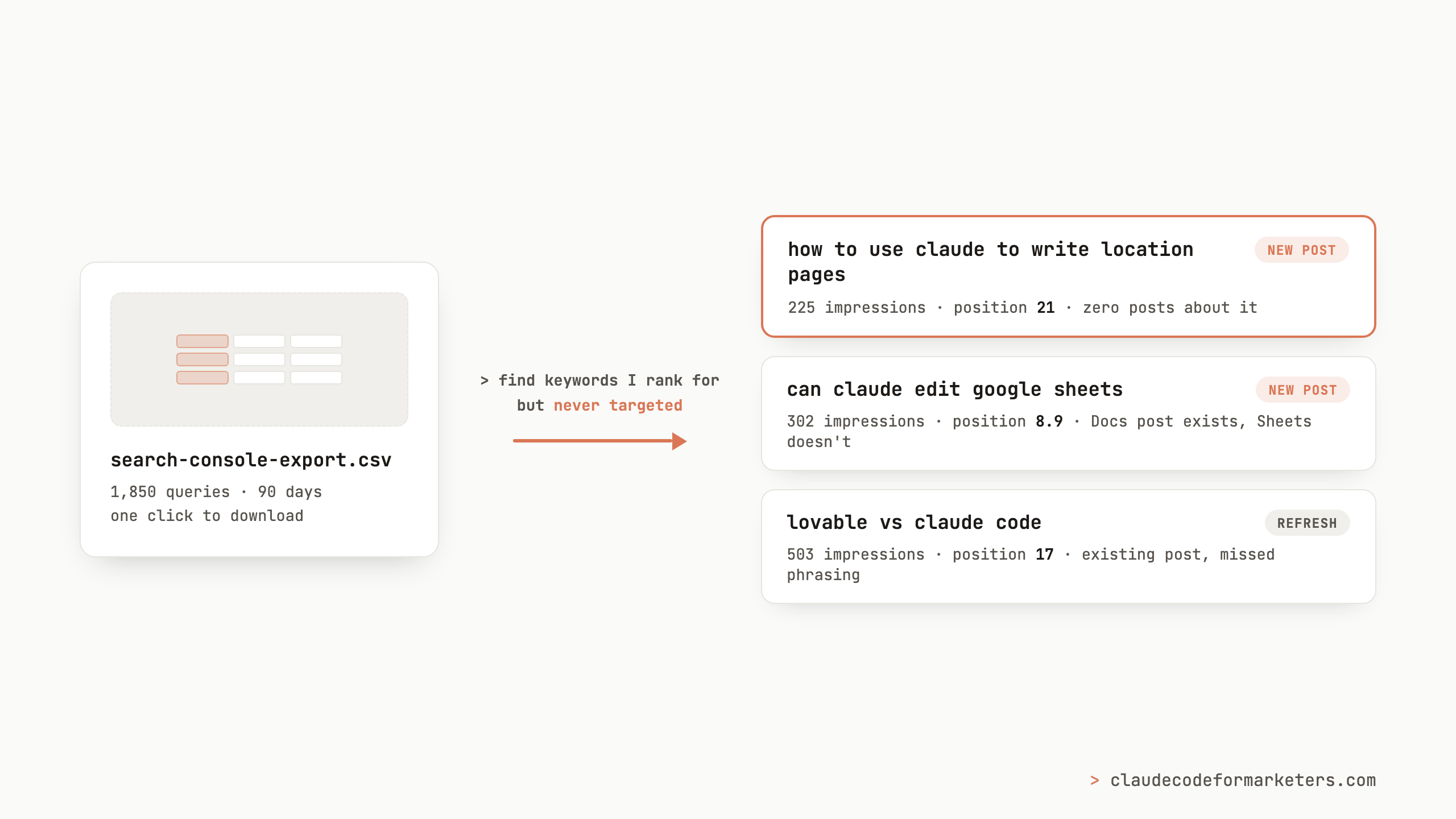
I used to open Google Search Console, look at the queries and positions and impressions, and have the distinct feeling that I was staring at something useful. The information was all right there, but what I struggled with was connecting the dots on what to actually do about any of it. Which numbers mattered? Which post should I touch first? Was anything in this table telling me what to write next?
It turns out the answers to all of those questions were sitting right there and I just needed to turn each data point into a small, repeatable workflow that helped me take action. That’s what I want to walk through in this post: four SEO workflows I run with Claude Code, each with a single input and a single output.
You don’t need a pricey Ahrefs subscription for any of this, and you don’t need to set up any APIs to start. The first input is a plain CSV export from Search Console, which you can get from just clicking the Export button. One quick note before we start: these workflows involve Claude running a lot of small analysis steps, which is exactly the kind of session where auto mode comes in handy.
Workflow 1: find the keywords you rank for but never targeted
Input: your Search Console query export. Output: a list of keywords you’re ranking for that none of your content actually targets.
This one is my favorite because it finds post ideas that are already working. Google has decided you deserve to rank for these queries even though you never tried, which I’d say is the strongest signal there is about what to write next.
Every post on this blog declares a target keyword for a given post. So the prompt you want to use is:
Here’s my Search Console query export and the list of keywords my posts target. Find queries where I’m ranking in the top 30 with at least 20 impressions, but no post of mine targets that query or anything close to it. Group similar queries together.
When I ran this against my own data (over a 90-day window), the output had some findings I did not expect:
- “how to use claude to write location pages”: 225 impressions at position 21, and I have never written a word about location pages.
- A whole Google Sheets cluster: “can claude edit google sheets” alone had 302 impressions at position 8.9. I have a Google Docs post. I do not have a Sheets post. Google apparently thinks I should.
- “lovable vs claude code”: 503 impressions at position 17, with zero clicks.
That last one taught me something about this workflow. I do have a post comparing Claude Code to Lovable, Cursor, and Bolt, it just targets the phrasing with Claude Code first. People searching the reversed phrase weren’t finding it. So not every “gap” means writing a new post, because sometimes the fix is adding the variant as a secondary keyword and refreshing the post you already have. The workflow surfaces both kinds, and telling them apart takes about ten seconds per keyword.
Workflow 2: check which of those keywords are worth the effort
Input: the keyword list from workflow 1. Output: the same list with search volume and competition data attached, so you can pick what to actually write.
Ranking signals from your own site tell you that Google likes you for a query, but they don’t tell you how many people search it. For that I use DataForSEO, which is the piece of this stack that replaces the expensive tool subscription: instead of $100+ a month, you pay per lookup. Claude Code calls the API directly once your credentials are in a file, and my six-keyword check cost nine cents.
Take these keywords and get search volume and competition for each from DataForSEO. Return them as a table sorted by volume.
Here’s what came back for my shortlist:
- “claude code install”: 22,200 searches a month. Enormous, and also good context: the top of that results page is owned by Anthropic’s official documentation, so I treat it as a refresh signal for my installation post rather than a jackpot.
- “lovable vs claude code”: 390 a month, low competition. That refresh post suggestion from earlier just moved up my list.
- “can claude edit google sheets”: 70 a month, which sounds small until you remember my site already had 302 impressions on it. Small volume plus proven ranking is a good bet.
- “how to use claude to write location pages”: no volume data at all, which makes it hard to evaluate for now.
That last result is why I don’t treat this workflow as a formula. My own Search Console shows 225 real impressions for a query the keyword volume data says nobody searches. Since the whole AI world is moving so fast, there’s sometimes a disagreement between historical keyword tools and real time data. When these data sources disagree with themselves, I fall back on a gut check: what are people actually asking about on Twitter and in my inbox? The hard numbers narrow the list, but in the end, it’s still my call.
Workflow 3: find the posts one push away from real traffic
Input: the same Search Console export. Output: a list of “striking distance” keywords, the queries where you rank in positions 5 through 15.
Positions 5 to 15 are in the zone where a modest improvement pays off most, because you’re on page one (or just off it) but below where the clicks happen. These are existing posts, already ranking, that need a push instead of a rewrite.
From this Search Console export, find queries with at least 30 impressions where my average position over the last month is between 5 and 15. Group them by the page that ranks, and sort by impressions.
My own striking-distance report is dominated by one thing: a dozen variations of Claude-plus-Google-Docs queries, sitting between positions 6 and 10. Every keyword variation points at the same post and this means that “refresh the Google Docs post” should be a top priority for me, because that’s going to be a change that has potential to move the needle in multiple ways. The report also surfaced a cluster of “claude 20 vs 100” pricing queries around position 9, which is the nudge I needed to update my Claude Max post with current plan details.
The output of this workflow is basically a ranked refresh queue. When I have an hour to work on this blog, I don’t wonder where to spend it anymore. As an advanced exercise, you could pass this data back into Claude and automate these kinds of fixes when the signal is strong enough.
Workflow 4: fix your internal links while you’re at it
Input: your blog’s content folder. Output: every post linked to at least two others.
This is the one workflow where the input isn’t Search Console data, it’s your site itself. Internal links are one of the few SEO levers entirely under your control, and they’re also the chore everyone (me included) puts off, because auditing 30 posts by hand is miserable.
I wrote about this one in detail in the /goal command post, so I’ll give you the short version: I handed Claude Code the goal that “every post should have at least 2 internal links to other published posts, verify the count for each file,” and four minutes later all 30 posts passed. I didn’t touch the keyboard while it ran. If you only try one workflow from this post, I’d suggest this one, because the input is just your own files and the result is visible immediately.
Where this road leads
Each of these workflows is one file in, one answer out, and each one is useful on its own. But once you’re running them regularly, you start to notice they chain together: workflow 1 feeds workflow 2, workflow 3 fills your refresh queue, and workflow 4 cleans up after every new post.
For me, where this ended up is in a workflow that wires it all together (plus analytics, email stats, and page-speed checks) into a system that runs the whole thing weekly and emails me a report on Sunday morning with prioritized fixes and post ideas. That system is a story for another post. Run the single-input workflows by hand first and when you’re getting good value out of them, then explore automating them because you know what “good” looks like and you know they’re dialed in.
If you’re newer to Claude Code and this all sounds appealing but ambitious, my free 7-day email course starts from zero and builds up to exactly this kind of workflow. And if you run workflow 1 on your own site, I’d love to hear the weirdest keyword you find yourself ranking for. Find me on Twitter or LinkedIn and tell me. Mine was location pages.
My free 7-day email course covers the foundations: installation, your first real workflow, and how to make Claude Code part of how you actually work. No coding background required.
No spam. Unsubscribe anytime.
"I watched Keanan work magic with Claude [Code] in the terminal. My brain: 'It's far too technical!' 'Dark mode? Not for me!' ...I shipped 4 things in my first month."
 Sarah Sherman Community Builder at Retool